
 English
Views: 0 Author: Site Editor Publish Time: 2026-09-05 Origin: Site


Live production workflows are currently experiencing a significant operational shift. Operators are rapidly moving away from isolated laser control software. They now prefer fully unified lighting desk environments. Fragmented control systems naturally increase programming time across your crew. They also complicate cue triggering. These fragmented setups frequently introduce noticeable sync latency during complex live shows. You need a cohesive workspace to execute precise visual cues. It helps you avoid juggling multiple platforms simultaneously. This article provides a transparent, technical roadmap. It explains routing intricate laser control directly through a primary desk. You will discover the necessary protocols required to handle heavy geometric data loads. We will highlight critical safety non-negotiables to keep your audience perfectly secure. Finally, we explore a specific integration workflow using the Captain Lighting Console. This integration will dramatically streamline your live programming.
Network protocols (Art-Net/sACN) offer significantly higher channel counts and lower latency for laser control compared to standard 5-pin DMX.
Successful integration requires dedicated interface hardware (e.g., FB4 integrated lasers or Mercury control systems) to translate console data into laser geometry.
Patching lasers in the Captain Lighting Console relies on pre-built multi-instance fixture profiles, drastically reducing mapping time.
Hardware E-stops and optical zoning remain mandatory safety requirements, regardless of software-level DMX overrides.
Standard DMX relies on 512 discrete channels per universe. Legacy systems used this standard heavily for simple dimmers. Complex laser fixtures demand significantly higher channel counts. Modern units require 30 to 50 channels per fixture. They use these parameters for X/Y sizing, rotation, color modulation, and animation selection. A single DMX universe exhausts incredibly quickly under these conditions. You can barely fit ten advanced lasers on one DMX line.
Network protocols completely solve this strict scaling problem. Art-Net and sACN serve as undisputed industry standards for data-heavy rigs. Network routing handles dense parameter data flawlessly. You achieve smooth geometric transitions natively. The network prevents bottlenecking your central console processor. Art-Net sends multiple universes over a standard Ethernet cable. sACN goes further by utilizing intelligent multicast streaming. It reduces unnecessary network traffic across your gigabit switches.
Latency remains a crucial consideration for live operators. Translation delays often occur naturally across complex systems. Signals travel between the desk, the network node, and the laser diode driver. Network protocols minimize this inherent translation delay. High-speed Ethernet ensures your visual cues snap instantly. They hit the beat precisely during intense live performances.
Protocol Comparison Chart
Protocol | Bandwidth Capacity | Typical Latency | Best Application |
|---|---|---|---|
Standard 5-Pin DMX | 512 Channels (1 Universe) | Moderate (Noticeable on complex chases) | Basic triggering, small setups |
Art-Net | 32,768 Universes | Low (Sub-millisecond over gigabit) | Large-scale live busking |
sACN | 63,999 Universes | Ultra-Low (Prioritized multicast) | Complex multi-console networks |
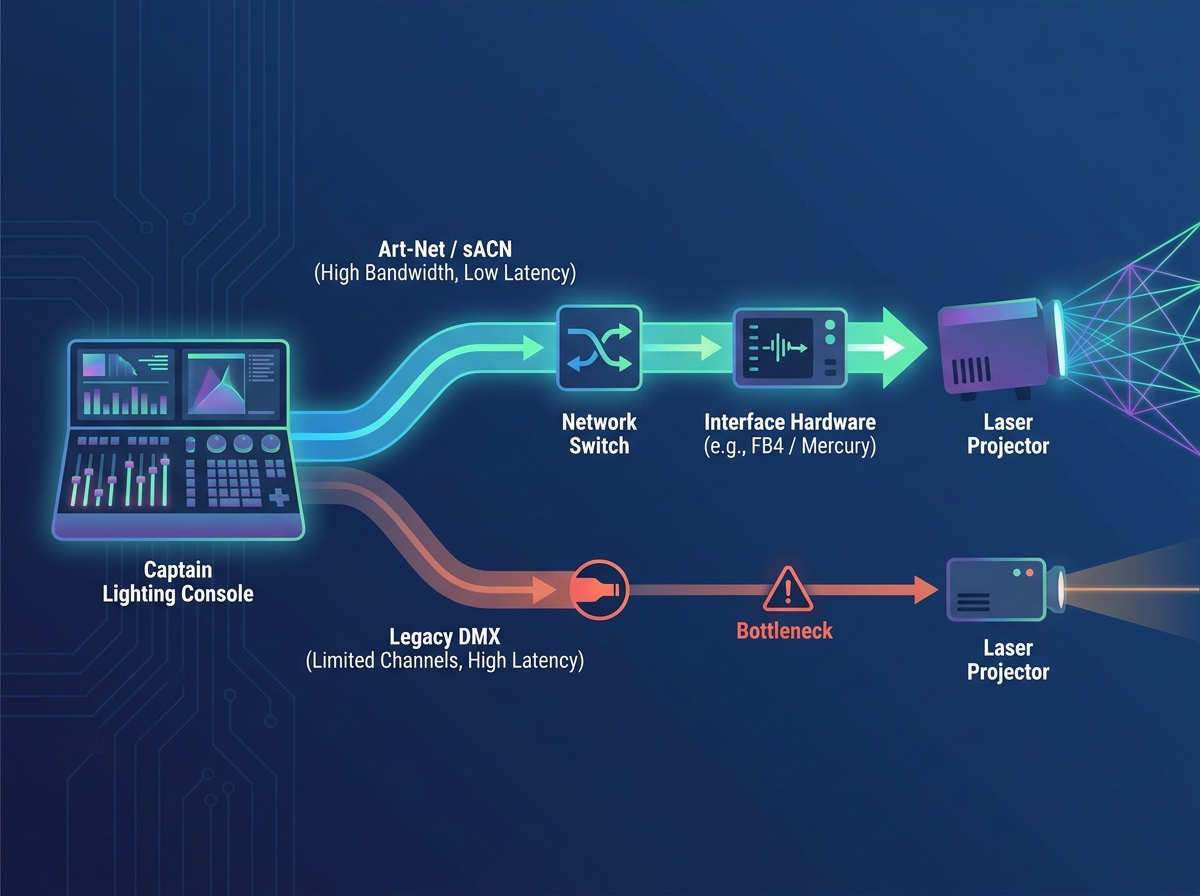
Lighting desks do not natively output analog ILDA signals. Traditional lasers require ILDA cables to receive analog voltage instructions. These voltages dictate delicate mirror movements and diode intensities. You must introduce dedicated intermediary hardware. Modern rigs typically run Pangolin BEYOND software paired alongside FB4 nodes. Alternatively, you might deploy direct-to-console systems like the X-Laser Mercury interface. These specific interfaces translate your digital DMX commands into analog geometric shapes.
Control philosophies generally fall into two distinct operational categories.
Server Mode (Triggering): You use the console merely to trigger pre-programmed cues. Operators build these cues beforehand inside dedicated laser software. This method treats the laser system exactly like a video media server. It guarantees complex shapes render perfectly every time.
Direct Mode (Live Busking): You utilize the built-in FX engines on your desk. This approach allows you to manipulate raw laser parameters live. You dynamically control size, position, speed, and color in real time.
Selection criteria depend heavily on your specific show parameters. Direct mode fits operators highly comfortable manipulating laser geometry. Server mode suits fast-paced tours facing limited daily programming time. Always choose the architecture matching your operator's skill level. Consider the overall show scale before committing to a specific mode.
How do you integrate this system practically? You start by finding the correct fixture profile. High-channel-count profiles reside inside the Captain Lighting Console library. Import the multi-instance fixture profile matching your specific laser node. Accurate profiles prevent unpredictable fixture behavior during showtime.
Next, you must assign your network configurations properly. Network configuration requires methodical steps to ensure long-term stability.
Navigate to the internal patch bay on your console interface.
Assign a dedicated Art-Net or sACN universe exclusively for the laser group.
Set a static IP address to guarantee a stable handshake.
Verify bilateral communication by pinging the laser node directly from the desk.
Disable unnecessary broadcast traffic to keep the local network clean.
Attribute mapping requires a highly logical programming approach. The console categorizes abstract laser parameters into familiar lighting terms. Pattern selection typically maps directly to the primary 'Gobo' wheel. X/Y scale corresponds intuitively to your 'Zoom' or 'Iris' parameters. Color modulation routes smoothly to your standard CMY or RGB encoders. This mapping translates complex geometry into highly familiar lighting concepts.
Workflow reality demands upfront operator patience. You must invest initial time to build custom palettes. Creating robust position and color presets on the Captain Lighting Console pays massive dividends. Your initial setup effort directly dictates your busking speed later. Dedicated presets keep your live show fluid and highly reactive.
Busking lasers alongside traditional fixtures creates stunning visual impacts. You achieve synchronized movement by grouping laser fixtures logically. Combine laser profiles alongside moving-head profiles inside your desk. This combination allows you to execute unified pan and tilt chases. You sweep dynamic beams across the arena simultaneously. The unified motion creates a massive, cohesive visual environment.
Timecode integration ensures absolute cue precision. Utilize the global BPM features available on your board. You can also feed external SMPTE timecode directly into the desk. This feature snaps complex laser animations perfectly to your primary lighting cues. It keeps the visual rhythm tight and incredibly accurate. Precise synchronization elevates the entire production value significantly.
Avoiding clashing attributes requires highly careful programming. Best practices dictate isolating specific laser sizing and rotation parameters. You want to exclude these vulnerable attributes from global intensity sweeps. An intensity sweep might accidentally override a crucial size parameter. This error can collapse the laser output unintentionally. A collapsed laser creates an incredibly unsafe, concentrated static beam. Always utilize parameter masks to protect your geometric shapes. Masks ensure dynamic effects only alter safe, intended parameters.
Safety remains the ultimate, non-negotiable priority in laser operation. We must continually enforce a fundamental industry rule. Software is never a safety device. DMX or Art-Net values dropping to zero do not replace a physical E-stop. A sudden software crash could freeze a hazardous beam in place. Physical hardware interrupts cut the unit power instantly.
Optical zoning and masking handle audience protection completely. Audience scanning masks must be hard-coded into the projector hardware. You must configure attenuation zones directly into the laser's internal node. Never restrict audience scanning solely via console pan or tilt limits. A simple encoder bump could bypass a software limit instantly. True safety zones reside permanently inside the laser projector itself.
Grand Master behavior requires highly specific console configuration. You must set up the desk carefully. The Grand Master fader must respect normal laser intensity channels. Pulling the fader down should kill the visible output immediately. However, it must never alter safety-critical active channels. Emergency beam blocks and dedicated safety resets must remain completely unaffected. They must persist even when the Grand Master sits completely at zero.
Controlling lasers directly from a primary lighting desk transforms your production workflow. It demands a highly robust network infrastructure. You also need incredibly accurate fixture profiling to ensure seamless translation. The unified approach bridges the distinct gap between traditional lighting and advanced laser geometry.
The Captain Lighting Console drastically simplifies this complex integration. It offers intuitive patching and reliable busking tools for hybrid operators.
Next Steps:
Download the latest laser fixture profile library for your designated console.
Establish a dedicated, physically isolated Art-Net network for your laser nodes.
Review an online network patching tutorial video to finalize your custom workspace configuration.
A: Yes, for basic triggering, but it is highly discouraged for direct parameter control due to channel limitations and slower refresh rates compared to Art-Net/sACN.
A: The console maps to the patterns stored on the laser's control node (e.g., the SD card on an FB4). The console triggers them; it does not generate the geometric shapes natively.
A: Professional laser nodes should be configured to "fail-safe" (blackout or hold a static safe cue) if the Art-Net signal drops. Physical hardware E-stops must always remain active and independent of the console.
A: You shouldn't. Safety zones and masking must be configured in the laser's dedicated setup software or hardware before handing control over to any lighting console.


